Timelines
Timelines help you keep your story’s chronology straight by visualizing events in order.
Creating a Timeline
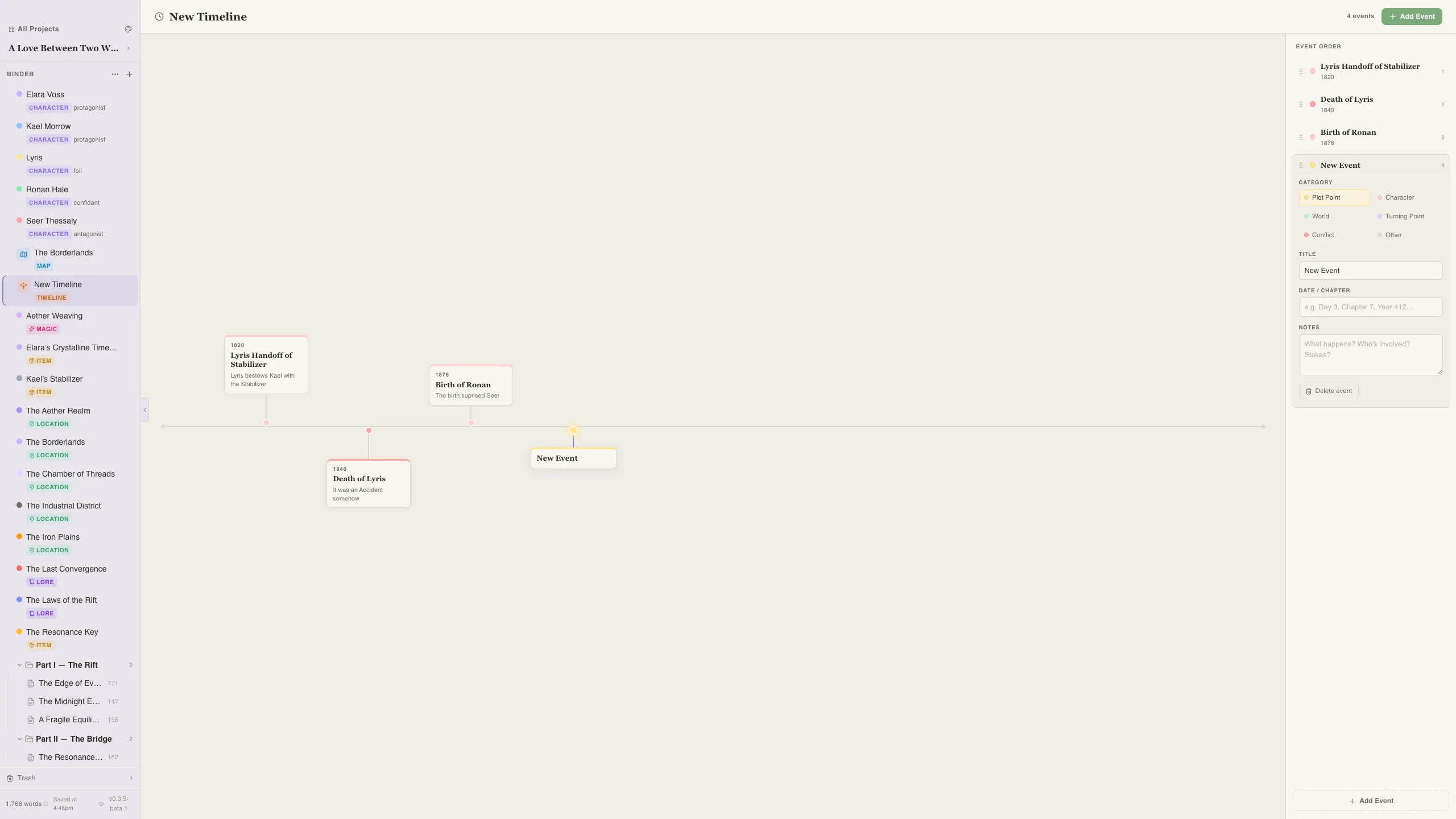
Section titled “Creating a Timeline”- Go to the Timelines section in the sidebar
- Click + New Timeline
- Start adding events
Events
Section titled “Events”Each event has:
- Title — What happened
- Position — Where it falls on the timeline
- Category — One of: Plot, Character, World, or Turning Point
Event Categories
Section titled “Event Categories”- Plot — Main story events and scenes
- Character — Character-specific milestones (births, deaths, revelations)
- World — Historical or background events that affect the setting
- Turning Point — Key moments where the story changes direction
Using Timelines
Section titled “Using Timelines”Timelines are great for:
- Plotting — Lay out your story beats before writing
- Continuity — Make sure events happen in the right order
- Backstory — Track world history that happened before your novel starts
- Parallel plots — See how different storylines overlap in time
Multiple Timelines
Section titled “Multiple Timelines”Create separate timelines for different purposes:
- One for the main plot
- One for backstory/world history
- One per major character’s personal timeline
- Use the Turning Point category sparingly — these should be your story’s biggest moments
- Review your timeline alongside the chapter list to ensure your manuscript matches your plan