
Codex Entries
The Codex is your world-building encyclopedia — a place to document everything about your story’s universe.
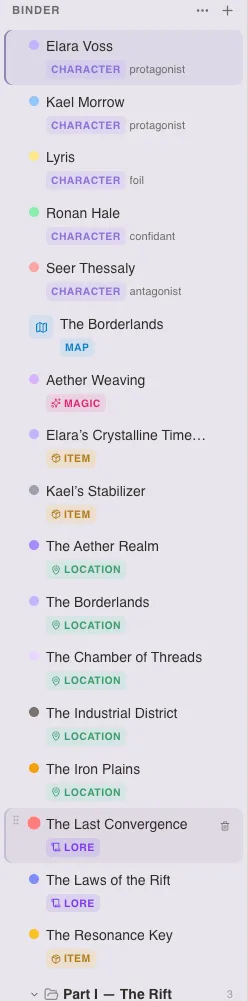
Entry Types
Section titled “Entry Types”Locations
Section titled “Locations”Places in your world — cities, taverns, planets, rooms. Document geography, atmosphere, history, and significance.
History, mythology, culture, religion, politics — the background fabric of your world that makes it feel real.
Artifacts, weapons, books, heirlooms — objects that matter to your story. Document their origin, properties, and significance.
Magic systems, powers, abilities, technologies — the extraordinary elements of your world. Define rules, limitations, and costs.
Creating an Entry
Section titled “Creating an Entry”- Go to the Codex section in the sidebar
- Click + and choose the entry type
- Fill in the details
Entry Fields
Section titled “Entry Fields”Each entry includes:
- Title — The entry name
- Notes — Rich-text notes (same editor as chapters)
- Images — Upload visual references
- Custom detail fields — Add your own fields for any data
- Tags — Categorize with project tags
- Color — Color-code for visual organization
- Note Cards — Additional freeform notes
Organization
Section titled “Organization”- Create folders to group related entries
- Use tags to create cross-cutting categories
- Color-code entries for visual distinction in the sidebar
Cross-Referencing
Section titled “Cross-Referencing”Type a codex entry’s name in your chapter text and it’s automatically detected. These become clickable links that let you jump to the entry from your manuscript.