
Session Tracking
Session tracking gives you an honest picture of your writing session — not just a net word count, but how many words you wrote and how many you edited.

How It Works
Section titled “How It Works”Every time you open a project, Writefully So starts a new session. As you write and edit across chapters, it tracks two numbers separately:
- Words written (+) — every word you add, across all chapters
- Words edited (-) — every word you remove, across all chapters
This means a productive editing session where you cut 200 words and add 50 shows +50 written, -200 edited instead of a confusing “0”.
The Status Bar
Section titled “The Status Bar”While you’re writing, the editor status bar shows your session at a glance:
- +N in green — words written this session
- -N in muted text — words edited (only shown if you’ve cut words)
- / Goal — your session word goal (click to edit)
- Progress bar — fills based on words written, not net change
The progress bar deliberately tracks gross words written. Editing doesn’t steal your progress — cutting 500 words of fluff is productive work, not a step backward.
Project Overview
Section titled “Project Overview”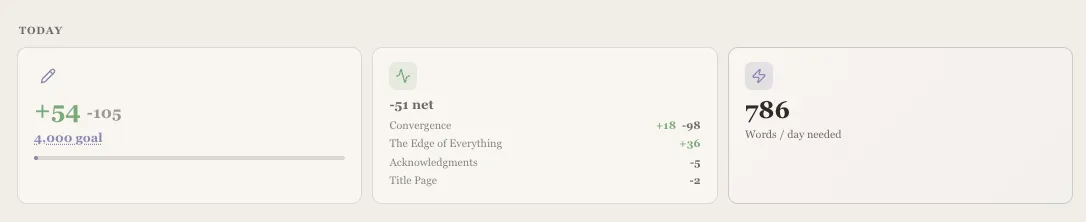
The project overview (corkboard) shows a richer session breakdown:
- Session card — your total words written and edited, with the goal and progress bar
- Chapter activity card — per-chapter breakdown showing exactly where your words went
For example, you might see:
- Chapter 3: +200 written, -30 edited
- Chapter 7: +50 written, -150 edited
This tells you at a glance that you expanded Chapter 3 and tightened Chapter 7.
Session Goal
Section titled “Session Goal”The default session goal is 1,500 words. You can change it anytime:
- Click the goal number in the status bar or on the project overview
- Type your new target
- Press Enter
Your goal is saved per project, so your novel can have a different target than your short story collection.
When Does a Session Reset?
Section titled “When Does a Session Reset?”A new session starts when you:
- Open the app and select a project
- Switch to a different project
Sessions persist as long as you stay in the same project, even if you switch between chapters.
- Don’t stress about the net number — a negative net just means you’re in editing mode, which is equally valuable
- Set realistic goals — 500 words per session is a solid habit; 1,500 is an ambitious but rewarding target
- Watch the chapter breakdown — it helps you notice if you’re spending all your time in one chapter when you should be moving forward