What Is Manuscript Health? A Zero-AI Writing Analysis Tool
Every writer has patterns. Some of them serve the story. Others sneak in without you noticing — the same sentence starter repeated eight times in a chapter, adverbs piling up in dialogue tags, or passive voice creeping in during action scenes.
Most tools that claim to catch these things use AI. They send your text to a server, run it through a language model, and return suggestions that may or may not understand what you’re going for. That’s a problem for two reasons: your words leave your machine, and the suggestions are often generic.
Manuscript Health takes a different approach. It’s a purely algorithmic analysis tool built into Writefully So. No AI, no cloud, no internet connection required. It reads your manuscript locally and gives you a clear picture of your writing patterns — not to tell you what’s wrong, but to help you see what’s there.
What it tracks
Manuscript Health breaks your writing down across four tabs: Overview, Words, Sentences, and By Chapter.
Overview
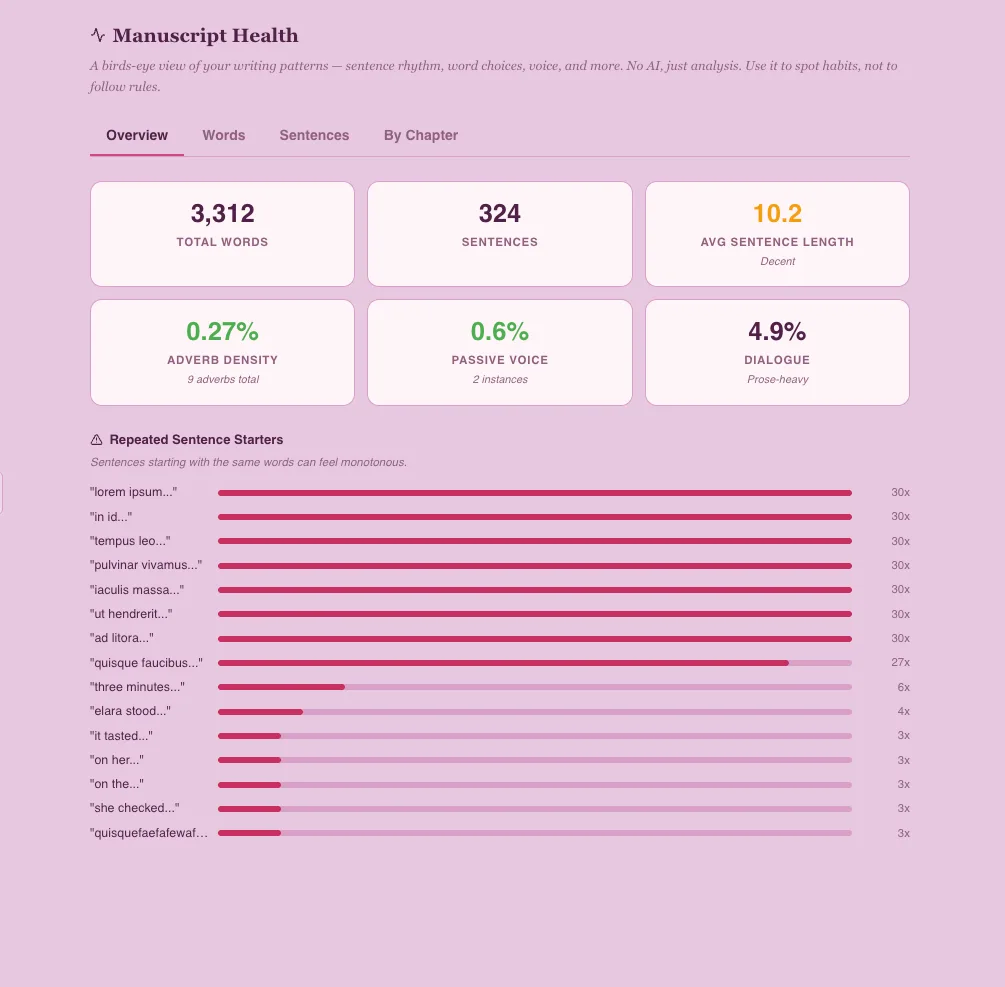
The Overview tab gives you six metrics at a glance:
- Total words and sentences — the raw scale of your manuscript
- Average sentence length — most published fiction falls between 12 and 20 words per sentence. This doesn’t mean every sentence should be 16 words; it means the average should land in that range, with plenty of variation
- Adverb density — the percentage of words ending in -ly. Under 2.5% is lean prose. Above 4% is worth a look. (Stephen King’s famous advice notwithstanding, adverbs aren’t evil — they’re just often a sign that a stronger verb exists.)
- Passive voice — the percentage of sentences using passive constructions like “the door was opened” instead of “she opened the door.” Under 8% is typical for fiction editors’ recommendations
- Dialogue ratio — how much of your manuscript is inside quotation marks. This varies wildly by genre. Thrillers and romance often run 40%+. Literary fiction sits closer to 20-30%
Below the stats, you’ll find Repeated Sentence Starters — a bar chart showing two-word phrases that begin three or more sentences. “She looked,” “He was,” “The room” — these are the patterns that make readers feel like they’re stuck in a loop.
Words
The Words tab ranks your most-used words (excluding common stop words like “the,” “and,” “was”) and your most frequent adverbs. High-frequency words aren’t automatically bad — “said” showing up often is fine, “suddenly” showing up 47 times less so.
This is where you spot the crutch words. Every writer has them. Seeing them ranked by count, with a bar chart showing relative frequency, makes them impossible to ignore.
Sentences
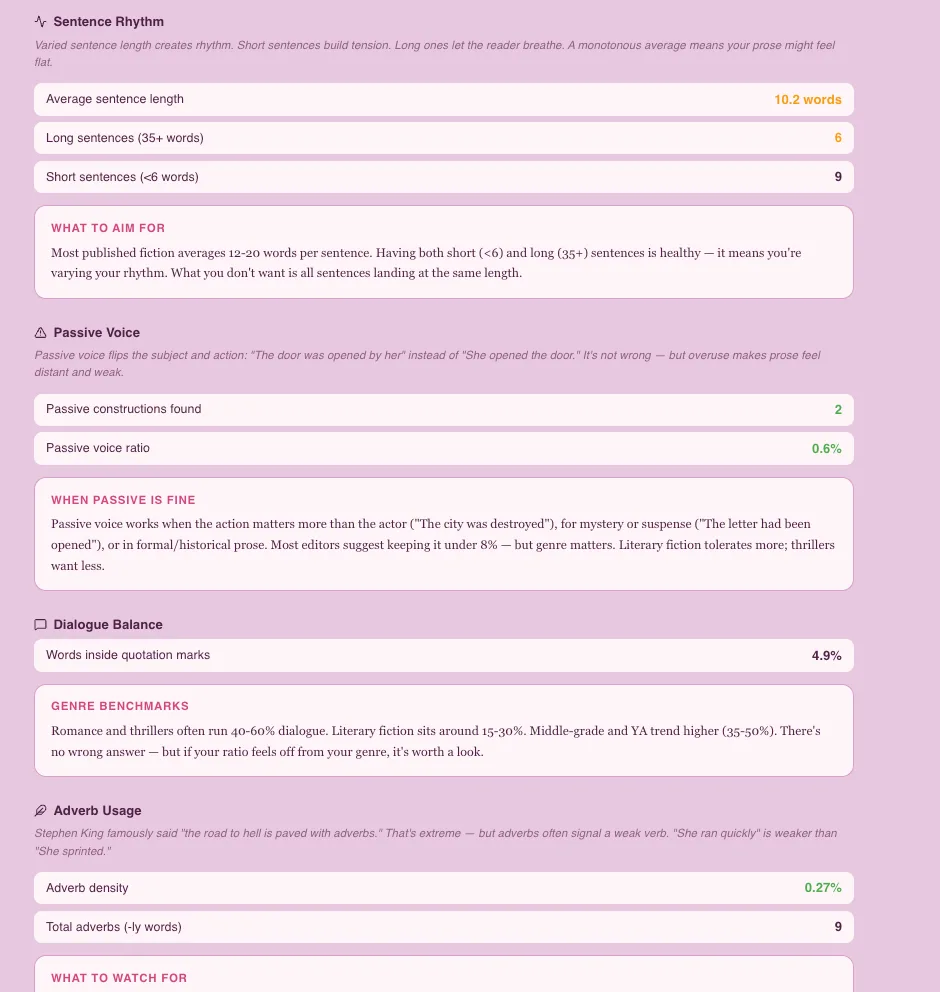
The Sentences tab goes deeper than numbers. Each metric comes with an explain box — a short editorial guide in serif font that puts the numbers in context.
For sentence rhythm, it explains why variation matters more than average: short sentences build tension, long ones let the reader breathe, and monotonous averages mean flat prose.
For passive voice, it explains when passive is actually fine — mystery (“the letter had been opened”), formal or historical prose, and moments where the action matters more than the actor (“the city was destroyed”). Not every instance needs fixing. The metric just tells you how much is there.
For dialogue balance, it gives genre benchmarks: romance and thrillers run dialogue-heavy, literary fiction leans toward prose, YA trends high. There’s no right answer — but if your ratio diverges sharply from your genre, it’s worth noticing.
For adverb usage, it explains the threshold ranges and offers practical advice: dialogue tag adverbs (“he said quietly”) are usually the easiest cuts, because “he whispered” does the same job with a stronger verb.
By Chapter
The By Chapter tab is a table comparing every chapter side by side: word count, sentence count, average sentence length, and adverb density. The last two columns are color-coded — green for within range, amber for slightly outside, red for notably outside.
A color legend at the top explains what the colors mean, and an explain box at the bottom describes each column’s thresholds in plain English. The colors aren’t scores. They’re lenses for spotting patterns — a chapter that’s all red might just be an intense action sequence, and that’s fine.
Why no AI?
Three reasons.
Privacy. Manuscript Health runs entirely on your machine. Your text is never sent anywhere. The analysis happens in the same process as the app itself — it reads your chapter content from the local SQLite database, runs the algorithms, and returns the results. No network requests, no APIs, no third-party services.
Transparency. Every metric is a straightforward algorithm you could reproduce with a pencil and paper. Sentence length is word count divided by sentence count. Adverb density is -ly words divided by total words. There’s no black box. When the tool says your passive voice ratio is 12%, you can verify it.
Reliability. AI suggestions vary between runs. Ask a language model to analyze the same passage twice and you’ll get different emphasis, different phrasing, sometimes different conclusions. Algorithmic analysis gives you the same answer every time. It’s a measuring tool, not an opinion.
What it’s not
Manuscript Health is not a grammar checker. It doesn’t flag comma splices or dangling modifiers. It’s not a style editor — it won’t suggest rewrites or tell you to “show, don’t tell.”
It’s a mirror. It shows you what’s in your prose so you can decide what to do about it. Some writers will see a 5% adverb density and aggressively cut. Others will see the same number and decide it fits their voice. Both are valid responses. The tool just makes sure you’re making that choice with your eyes open.
How to use it
Open Manuscript Health from the Project Overview card grid or from the sidebar tools menu (the gear icon) under Views. It analyzes your entire manuscript each time you open it, so you’ll always see current numbers.
The best workflow: write first, analyze later. Don’t check Manuscript Health mid-chapter — it’ll make you self-conscious. Finish a draft, let it sit, then open the analysis with fresh eyes. Look for the biggest outliers, not the small numbers. A chapter with 30% adverb density is worth investigating. A chapter at 3.1% instead of 2.5% is noise.
And remember the tagline on the page itself: Use it to spot habits, not to follow rules.
Manuscript Health is available now in Writefully So v0.4.0 and later. It’s free, private, and requires no internet connection.
This post was drafted with AI assistance and reviewed by our team. We use AI for product communication — never for creative writing, and never to train on yours.
Back to all posts